
Best Ergonomic Office Chair for Online Classes & Long Study Sessions (Tested Picks from $200 to $700)
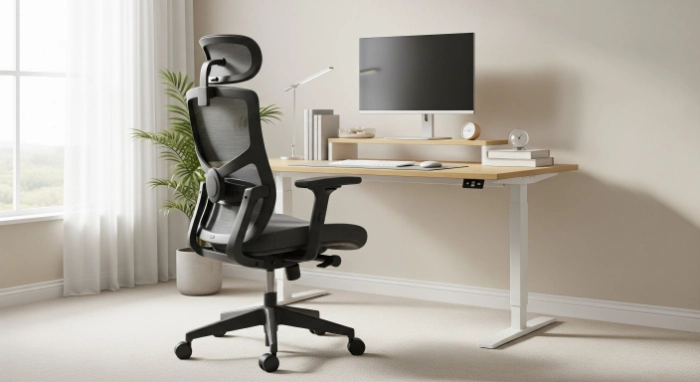
Best ergonomic chair for online classes and long study sessions in 2026. Tested picks from $200 to $700 for grad students and professionals.
If you are sitting through back-to-back Zoom lectures, grading papers at midnight, or grinding through a certification course after your day job ends, your chair matters more than your laptop does. A bad chair turns a two-hour study block into a battle with your lower back. The best office chair for online classes in 2026 needs to do one job well: keep you comfortable and focused for hours, not just minutes.
We looked at how the major testing labs at CNET, Wired, Wirecutter, and PCMag evaluate office and gaming chairs this year, then matched their findings against what actually matters for students and working professionals on a budget. Below are the picks worth your money, organized by price, plus what to look for if none of these fit your setup.
Who Needs an Ergonomic Chair for Long Study Sessions
Anyone logging more than three hours a day in a seat needs a chair built for it. That includes grad students writing dissertations, professionals taking online certification courses to upskill, and recent graduates studying for licensing exams while working full-time.
A dining chair or a $40 mesh special from a big box store was never designed for this. Those chairs work fine for a quick email check. They start to hurt after the second hour of a lecture or a thesis edit.
What Makes a Chair Good for Online Classes and Studying
Before getting into specific picks, it helps to know what actually separates a study-friendly chair from a regular desk chair. Online classes and long reading sessions put different stress on your body than typing all day does, since you are often leaning forward toward a screen or hunched over notes.
Lumbar Support That Adjusts to Your Back
Lumbar support is the part of the chair that pushes into your lower spine to maintain its natural curve. Without it, your lower back rounds out over time, which is the most common cause of desk-related back pain.
The best chairs let you adjust the height and depth of the lumbar support so it actually meets your spine, not just the manufacturer's idea of an average back. CNET's testing team found this to be one of the biggest differentiators between chairs that feel fine for an hour and chairs that hold up for a full workday of sitting.
Breathable Material for Long Sessions
Mesh backs let air circulate so you do not end up sweaty during a three-hour study block, especially if your study space is not air-conditioned. Foam and cushioned seats feel plush at first, but can trap heat and lose support after a year or two of daily use.
Wired's chair testers, who sat through dozens of models, noted that breathability becomes a bigger factor the longer your sessions run. A chair that feels great for twenty minutes in a showroom can feel very different after three hours of an online lecture.
Real Adjustability, Not Just a Lever
Look for seat height, seat depth, armrest height, and recline tension that you can actually change. Cheap chairs often advertise "adjustable" but only let you move the height up or down.
A chair that fits a 5'2" student and a 6'2" professional equally well needs more than one adjustment point. This is where the $200 to $700 range starts to separate itself from sub-$150 chairs.
Weight Capacity and Build Quality
Check the weight rating before buying, since most office chairs are rated for 250-400 pounds, depending on the model. A sturdier frame also tends to mean the chair holds its shape and support longer, which matters if you are using it daily for a multi-year degree or certification path.
Best Ergonomic Office Chairs for Online Classes, by Budget
Best Under $300: Reliable Daily Comfort Without Overspending
For students and early career professionals, a chair in the $200 to $300 range can deliver solid lumbar support and a breathable mesh back without the premium price tag of office furniture brands. Look for models with adjustable lumbar depth, a waterfall seat edge to reduce pressure behind the knees during long sessions, and at least basic armrest adjustment.
This price point is where you start to see real ergonomic engineering rather than just a cushioned seat on wheels. Multiple testing teams, including PCMag's office chair reviewers, have noted that the $250 to $350 range now includes chairs that perform nearly as well as models costing twice as much.
Best for: Grad students and recent grads setting up a first home study space on a budget.
Best $300 to $500: The Sweet Spot for Daily Study and Work
This is where most professionals taking online certification courses should be shopping. At this tier, you typically get adjustable lumbar support that moves with your spine, breathable mesh or high-quality foam, and armrests that adjust in multiple directions.
Chairs in this range are built to handle eight or more hours a day without breaking down within a year. If you are studying after work most nights and sitting at a desk all day at work, this is the range that protects your back over the long term.
Best for: Working professionals upskilling through online courses while holding down a full-time job.
Best $500 to $700: Premium Support for Heavy Daily Use
At the top of this budget range, you get the kind of ergonomic engineering found in higher-end office furniture. Think dynamic lumbar that adjusts automatically as you shift positions, four-way adjustable armrests, and recline mechanisms that lock at multiple angles rather than just snapping back upright.
Wirecutter's testing of premium task and gaming chairs in this range found that the extra cost mainly buys you better long-term durability and finer adjustment, not a dramatically different sitting experience on day one. If your study sessions regularly run for four or more hours, that long-term durability is worth the cost.
Best for: Professionals and doctoral students spending most of their waking hours at a desk for years at a time.
Ergonomic Office Chair vs. Gaming Chair for Studying
Gaming chairs have become more ergonomic in recent years, and some now compete directly with office chairs in terms of lumbar support and adjustability. Wirecutter's gaming chair testing found that the better models in this category now include adjustable lumbar support and recline ranges built for sitting for hours at a stretch, not just gaming.
That said, most gaming chairs use a bucket seat design built for reclining and gaming posture, while traditional ergonomic office chairs are built for an upright, forward-leaning posture that fits reading, typing notes, and video calls better. If your study sessions involve a lot of writing or typing, a task-style ergonomic chair will usually serve you better than a racing-style gaming chair.
How to Choose the Right Chair for Your Study Setup
Measure Your Space First
Some ergonomic chairs are bulkier than standard desk chairs due to their adjustable lumbar support and headrests. Measure the space under your desk and around your chair before buying, especially if you are working in a small apartment or dorm room.
Match the Chair to Your Body, Not Just the Reviews
The "best" chair according to a testing lab is not automatically the best chair for you. Seat depth matters more than most people realize. If the front edge of the seat presses into the back of your knees, even a highly rated chair will feel uncomfortable within an hour.
Budget for the Hours You Actually Sit
If you are studying two hours a night, a $250 chair with solid lumbar support is plenty. If you are in online classes most of the day on top of a full-time job, paying more for a chair in the $500 to $700 range will pay off in fewer aches and a chair that lasts through your entire program.
Frequently Asked Questions
What is the best budget chair for online classes?
A chair in the $200 to $300 range with adjustable lumbar support and a breathable mesh back cover meets most students' needs without overspending. Look for a waterfall seat edge and at least basic armrest adjustment at this price.
Do I need an ergonomic chair for grad school?
If you are spending more than two or three hours a day reading, writing, or attending online classes, an ergonomic chair helps prevent lower back and neck strain from sitting in an unsupportive chair for long stretches. It is one of the more affordable investments you can make in your physical comfort during a multi-year program.
What is the difference between an ergonomic office chair and a gaming chair?
An ergonomic office chair is built for an upright, forward-leaning posture suited to typing, writing, and video calls. A gaming chair uses a bucket seat designed more for reclining. Some premium gaming chairs now include office-grade lumbar support, but task chairs generally provide better support for study and work postures.
How long do ergonomic office chairs last?
A well-built chair in the $300 to $700 range typically lasts five to ten years with daily use, depending on the materials and how well it is maintained. Mesh backs tend to outlast foam cushions, which can compress and lose support after a few years of regular sitting.
Is mesh or cushioned seating better for long study sessions?
Mesh stays cooler over long sessions and tends to hold its shape longer, while cushioned seats feel softer at first but can lose support over time. If your study sessions run three or more hours, mesh is usually the more comfortable long-term choice.
What weight capacity should I look for in a study chair?
Most quality ergonomic chairs are rated between 250 and 400 pounds. Check the manufacturer's specific weight rating before buying, since this also affects how durable the frame and gas lift mechanism will be over the years of daily use.
Ready to Upgrade Your Study Setup?
Your chair is the one piece of equipment that touches every single study session, every certification module, and every online lecture you sit through. Pick the budget tier that matches how many hours you actually spend in the seat, not just the one with the best reviews.
Browse our full chair comparisons and ergonomic setup guides on ScoreThat to find the right fit for your space, your body, and your budget before your next semester or course load begins.