
Best Note-Taking App for Online College Students in 2026 (Tested on Real Lecture, Reading, and Group-Study Workflows)
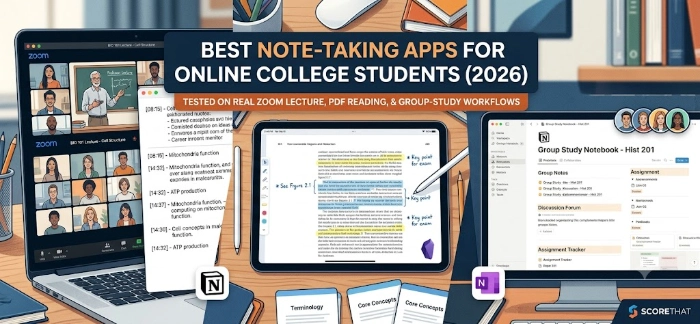
Best note-taking app for online college students in 2026, tested on Zoom lectures, PDF reading, and group study. Notion vs Obsidian and more.
If you are taking classes online, you already know the problem. Your lecture happens on Zoom, your textbook lives in a PDF, and your study group communicates across three different apps. Finding the best note-taking app for online college students in 2026 means finding one tool that can keep up with all three.
We tested eight of the most popular apps against the workflows online learners actually deal with every week. This is not a generic productivity roundup. It is built specifically for students and working professionals learning remotely, so every recommendation is tied to a real task: capturing a live Zoom lecture, marking up a PDF textbook, or running a shared notebook with a study group.
What Makes a Note-Taking App Good for Online Learners in 2026
Online learning puts different demands on a note-taking app than a traditional classroom does. A student sitting in a lecture hall can glance up and ask a question. A student watching a recorded lecture cannot. That gap has to be filled by the app itself.
A strong app for online learners in 2026 needs three things. It needs to capture information quickly, whether that is typed notes, a PDF highlight, or an audio clip from a lecture. It needs to organize that information so you can find it again during finals week. And it needs to let you share notes with classmates without turning into a full project management tool you never wanted.
Note-taking app here means any application built to capture, store, and organize written or typed information, as opposed to a document editor built for finished writing like Word or Google Docs.
How We Tested: Three Real Online Learning Workflows
We did not just open each app and poke around. We ran all eight apps through three workflows that mirror what an online student actually does in a normal week.
Workflow 1: A Note-Taking App That Syncs With Zoom Lectures
Live and recorded Zoom lectures are the backbone of online learning. For this test, we looked at how well each app handles capturing notes during a Zoom session and linking them back to the recording later, so you can search a transcript and jump straight to the moment a professor covered a specific topic.
None of the eight apps we ranked are dedicated meeting transcription tools like Otter.ai or Notability. But several connect to Zoom recordings, meeting transcripts, or audio in ways that matter for lecture-heavy semesters, and we scored each one on how much manual work that connection still requires.
Workflow 2: PDF Textbook Highlighting and Flashcard Export
Online courses lean heavily on digital textbooks and PDF readings. We tested how easily each app lets you highlight a PDF, add margin notes next to a specific passage, and pull that material back out later as flashcards or a study guide.
Workflow 3: Group Study and Shared Notebooks
Online programs often replace in-person study groups with a shared doc or workspace. We tested how each app handles a shared notebook: how easy it is to invite classmates, how notes stay organized when three people are editing at once, and whether the free plan even allows collaboration at all.
The 8 Apps We Ranked
Here is the full lineup, in the order we tested them: Notion, Obsidian, Microsoft OneNote, Logseq, Apple Notes, Google Keep, Joplin, and Anytype.
Each one takes a genuinely different approach. Notion and Anytype are database-first workspaces. Obsidian and Logseq are markdown-based tools built around linking ideas together. OneNote and Apple Notes are closer to a digital notebook. Google Keep and Joplin are lighter, faster, and less concerned with structure.
Notion vs Obsidian for Students in 2026 (The Real Answer)
This is the comparison every online student eventually searches, so let's settle it plainly.
Notion is built around databases, templates, and a shared workspace. It is the stronger pick for tracking assignments, running a group project, and keeping a class dashboard that classmates can also edit. Its free education plan removes cost as a barrier for most students.
Obsidian is built around plain markdown files stored locally, with backlinks that connect related notes into a graph. It is the stronger pick for solo studying, reading notes, and long-term review, because it is fast, works offline, and does not lock your notes into a proprietary format.
The honest answer, and the one most experienced students land on after a semester or two, is that Notion works better for coordinating with people and Obsidian works better for thinking on your own. One breakdown of the two tools put it simply: choose Obsidian for solo study and research, and choose Notion for group projects and class operations. If you only have time to learn one tool, pick based on which problem is bigger for you this semester: staying organized with a group, or building a personal library of notes you can search for years.
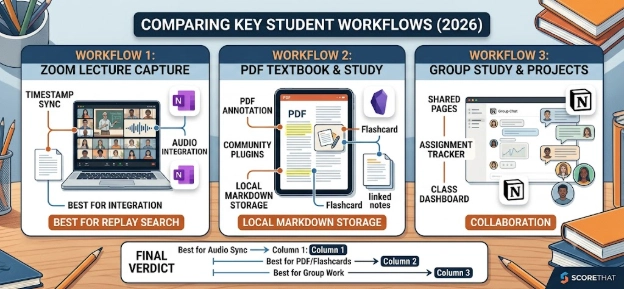
Best Note-Taking App for Online College Students in 2026, by Workflow
Best for Zoom Lecture Capture and Replay Search
Top pick: OneNote. OneNote's audio recording feature links your typed notes to the exact timestamp in the recording, so tapping a line of notes jumps you straight to that moment in the audio. That makes it one of the few general note apps that genuinely helps with lecture replay, not just lecture capture.
Alternatives: Notion works well if your school already records Zoom sessions and drops transcripts into a shared drive, since you can embed or link that transcript directly into a class page. Obsidian works well if you prefer to paste a Zoom transcript into a markdown note and then link key terms to your existing notes on that topic.
Best for PDF Reading and Flashcard Export
Top pick: Obsidian. With community plugins, Obsidian lets you annotate PDFs, pull highlights into linked notes, and export material into flashcard-ready formats. Because notes are stored as local markdown files, none of that work is locked behind a subscription.
Alternatives: Notion handles PDF uploads and embedded margin comments cleanly if you would rather stay inside a single shared workspace. Joplin is a solid lightweight option if you want basic PDF annotation without installing a lot of extensions.
Best for Group Study and Shared Notebooks
Top pick: Notion. Shared pages, comments, and a class dashboard make it easy for a study group to work in one place instead of texting screenshots back and forth. The free education plan includes guest collaborators, which most competitors charge for.
Alternatives: Anytype is worth a look if data privacy is a priority for your group, since it offers local-first storage with optional shared spaces. Apple Notes is a fine, no-setup option for smaller study pairs who already live in the Apple ecosystem.
Quick Comparison Table
Frequently Asked Questions
What is the best note-taking app for online college students in 2026? There is no single winner for every student. OneNote is strongest for Zoom lecture capture and replay, Obsidian is strongest for PDF reading and long-term study notes, and Notion is strongest for group projects and shared class notebooks.
Which note-taking app syncs with Zoom lectures? OneNote links typed notes to timestamps in a linked audio recording. Notion and Obsidian can both hold Zoom transcripts if your course provides them, but neither joins or records a Zoom call automatically the way a dedicated transcription tool does.
Notion vs Obsidian for students in 2026: which should I pick? Pick Notion if your biggest challenge is coordinating with classmates and tracking deadlines. Pick Obsidian if your biggest challenge is organizing what you are learning and reviewing it later. Many students end up using both.
Is Obsidian really free for students? Yes. The core app has no feature restrictions for personal use. You only pay if you want the optional cross-device Sync service or a commercial license.
Can I use these apps offline? Obsidian, Logseq, Joplin, and Apple Notes all work fully offline since your notes are stored locally. Notion and Google Keep require an internet connection for most features.
What is e-learning? E-learning is education delivered through digital tools and the internet rather than in a physical classroom, including recorded lectures, online readings, and web-based coursework.
Ready to Build a Note System That Actually Works
Pick the app that matches your busiest workflow this semester, not the one with the most features. Try your top pick for two weeks of real coursework before switching. If you want more breakdowns like this one for online learners, keep exploring the guides on ScoreThat.
Source referenced: Obsidian vs Notion: Which Fits Your Workflow in 2026? — AFFiNE